TL;DR
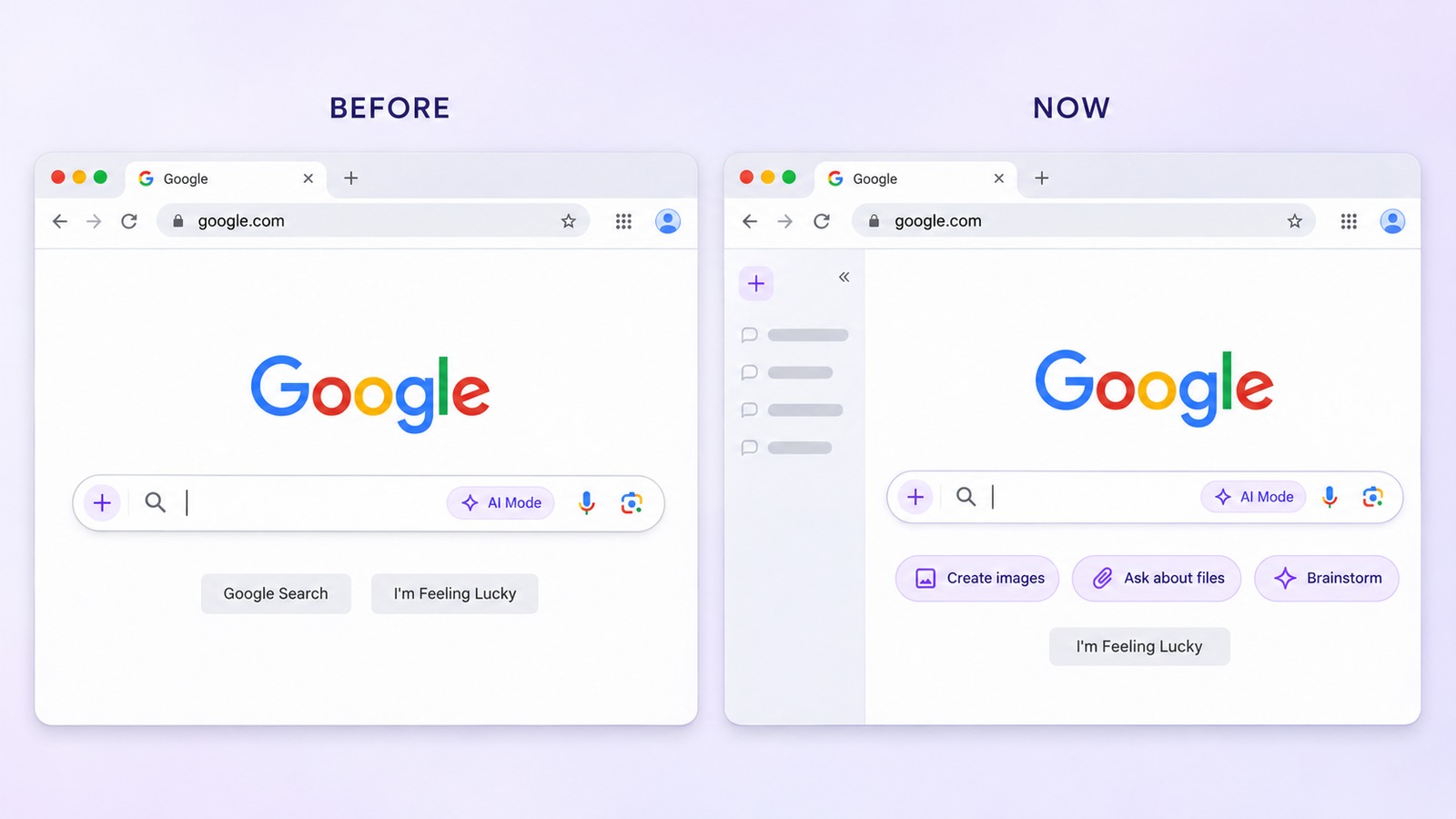
From 19 November 2026, Google began rolling out a desktop homepage with no Search button, Gemini shortcuts under the box and a sidebar of past AI chats.
Pressing Enter still gives normal results, but every new element on the page leads to AI Mode, where questions run three times longer than normal searches.
Brands should ask Google's AI Mode what their buyers ask, test the long version of each question, and fix the sites the answers rely on.
What happened
Google's homepage has always had two buttons under the search box: Google Search and I'm Feeling Lucky. One of them is now going away.
On 19 November 2026, Robby Stein, a vice president at Google Search, said on X that a new desktop homepage is rolling out worldwide. The Google Search button is gone. In its place sit three shortcuts that open Gemini, Google's AI: make an image, upload a file, or brainstorm.
A new sidebar on the left lists your recent AI Mode searches and Gemini chats, with a button to start a new chat. You can close it, but it is there by default.
Stein's reason, as quoted in reports: "People are coming to Search with more questions that aren't just one and done." He said the sidebar "made a big difference" in Google's tests.
The change is for computers only, and it is going out in stages, so many people will not see it yet. Google first tested a homepage without the button in August.
What did not change
Typing a question and pressing Enter still gives the usual page of results. Clicking a suggestion does the same. I'm Feeling Lucky stays, for now. Reports say a person still has to pick AI Mode to get an AI answer.
So nobody is forced into AI. But look at what the page now offers. Every new thing on it leads to AI. The one button that meant "just search" is the one that went.
Why Google is doing this
Google shared two numbers last month that explain the new page.
On its earnings call on 28 October, CEO Sundar Pichai said questions in AI Mode are on average three times longer than normal searches.
He also said one in five AI Mode searches around the world uses voice, an image or a document.
Those are the people the new page is built for: someone with a long question, someone who wants to upload a file, someone who wants to come back to a chat they started yesterday. The upload shortcut and the chat history in the sidebar serve exactly them.
Why this matters for brands
When a buyer types "best billing software for a small clinic" into Google and gets a page of links, a brand can show up in several places on it. In an AI answer, the brand is named or it is not, and the reader often goes no further.
Each step like this one moves a few more of those questions from the results page into an AI answer. This step is small. But it sits on the front page of Google Search itself, the page most people open when they start looking for something.
The sidebar matters too. A chat that sits in the sidebar is a chat people come back to. A buyer who returns to the same chat keeps building on the first answer, and on the brands it named.
The other side
This is not the end of the results page, and it is fair to say so.
It is on computers only. Much of search happens on phones, and Google has not announced the same change there.
Habits are strong. A person who types and presses Enter will see no difference at all, and Google has not said how many people click the Search button rather than pressing Enter.
Not everyone likes it. tbreak, a tech news site, called removing the button "a worse trade", and said Google could promote Gemini without hiding the plain way to search.
And Google has shared no numbers on what the new page does to clicks. Anyone who tells you how much traffic this will cost a brand is guessing.
What this means for brands
The ranking report is still worth reading. It is no longer the whole picture.
- Ask Google's AI Mode what your buyers ask. Take the ten questions your buyers ask most, ask them in AI Mode while logged out, and write down whether you are named, where, and which sites the answer links to.
- Test the long version of each question. People ask AI Mode longer, more specific questions than they type into search. Add the details a real buyer would: budget, city, the job they need done.
- Fix the sources, not only your own page. AI Mode builds its answer from pages it trusts and links to them. If those pages leave you out or get your facts wrong, that is where the work starts.
The homepage still lets people search the old way. It just no longer asks them to.
Sources
Date
November 23, 2026